帮助与常见问题/导入指南

导出你的 SiYuan 笔记
思源笔记(SiYuan)会把整个工作空间导出为一个 Data.zip。这个文件会带上每个笔记本,以及其中的嵌套文档、标签、块引用、资源和日期。
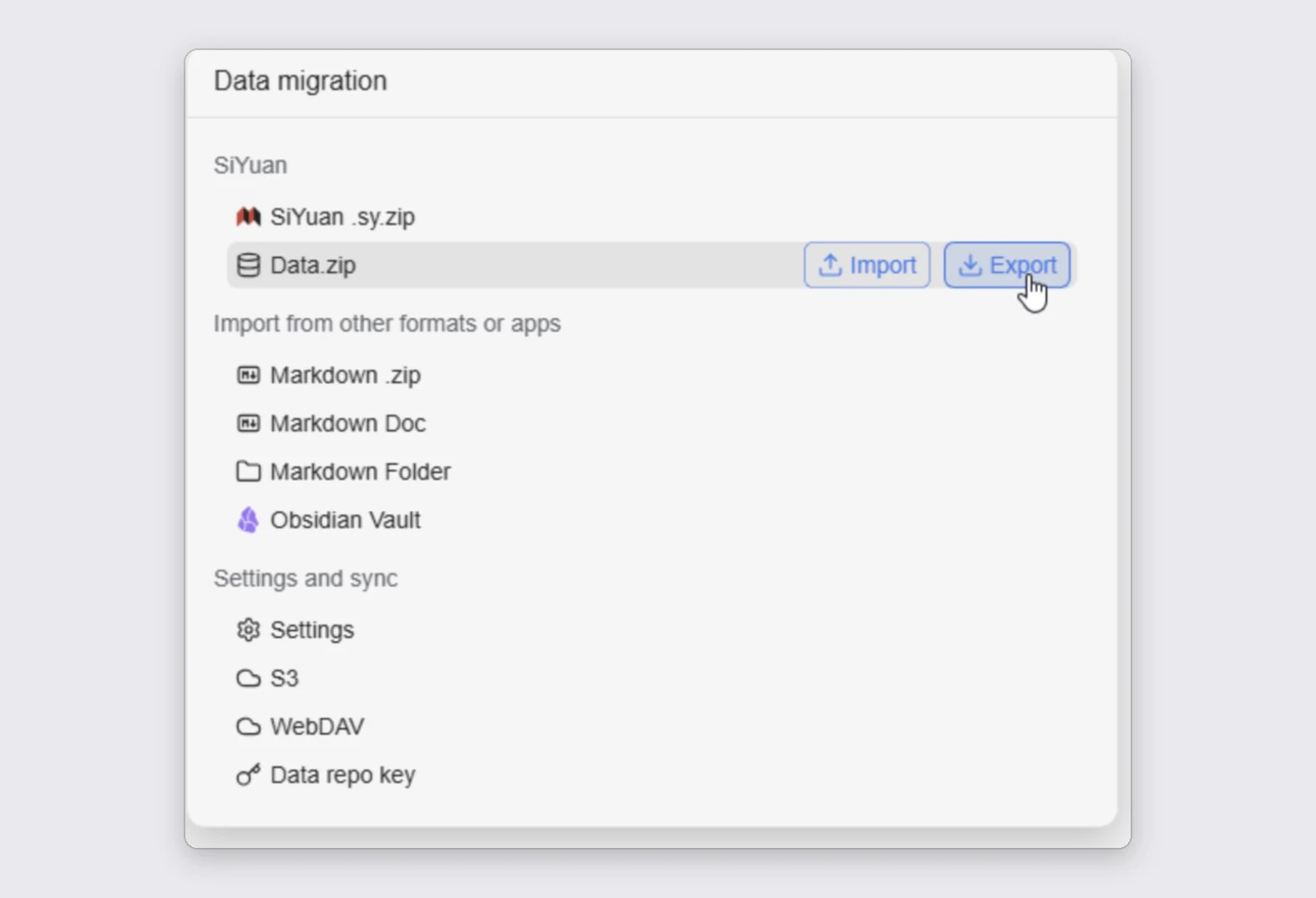
把工作空间导出为 Data.zip
如果只想迁移一个笔记本,在“文档”面板(Documents)中右键点击它,选择 Export > “SiYuan .sy.zip”。我们读取这个文件的方式相同。
- 在电脑上打开 SiYuan。
- 点击左上角的 SiYuan 菜单,选择“数据迁移”(Data migration)。
- 在 SiYuan 下,把指针悬停在“Data.zip”上,点击它的 Export 按钮。
- 选择一个文件夹。SiYuan 会写出一个 .zip,里面包含工作空间中的所有笔记本。
- 把这个 .zip 原样拖进来。
解锁加密的笔记本并单独导出
Data.zip 会让加密的笔记本保持加密,所以我们无法读取。我们会跳过它,导入预览会列出它的名称。请在 SiYuan 中解锁该笔记本,把它导出为“SiYuan .sy.zip”,再把那个文件也拖进来:这种导出是可读的。
选 Data.zip,不要选 Markdown
Markdown .zip 导出会保留文字,但漏掉文档标签和日期,还会把块引用写成纯文本或脚注。如果你只有这个,我们也能读取,每条笔记的日期会是导入当天。
会带来什么
每个笔记本会变成一个文件夹,嵌套的文档会变成嵌套的文件夹。既有子文档又有自己正文的文档,会变成同名文件夹里的一条笔记。每条笔记都保留它的标签,以及 SiYuan 记录的创建和更新日期。
标题、列表、清单、引用、带语言的代码、保留对齐方式的表格、数学公式、标注、高亮和文字颜色都会原样带过来。块引用会变成笔记链接,图片和文件会导入到你的存储空间,加了书签的文档会导入后保持置顶。
数据库会变成包含其可见列的表格,标签页会变成折叠块,思维导图会变成嵌套列表。闪卡保留为纯文本,嵌入查询保留为代码。SiYuan 的导出里没有回收站,所以已删除的文档会留在它的历史记录中。
导入到 PrivacyNotes
- 打开 PrivacyNotes,进入设置迁移。
- 选择 SiYuan 作为来源。
- 拖入你刚导出的文件,或点击浏览选择。
- 查看预览中显示将要导入的内容,然后开始导入。
还是没解决?问问你的 AI 智能体。
几秒钟就能得到答案,不用等回复。你的助手会一次读完全部 192 条解答和每份导入指南,因此能把它们结合起来,针对你的问题继续追问,并用你自己的话讲解。这一切我们都看不到,因为我们没有运行聊天机器人。
- 复制提示词。
- 把它粘贴到 ChatGPT、Claude、Gemini 或任何其他 AI 助手。
- 用你自己的语言提问。
- 保留这个对话。
显示 AI 提示词
Answer my questions about PrivacyNotes using only its help center, its changelog and its security documentation.

Start here: https://privacynotes.app/llms-index.txt
It lists every question with the page that answers it. Fetch the one or two that match mine.
If you can only make one request, fetch https://privacynotes.app/llms-full.txt instead.
If you cannot fetch a .txt or .md file, read https://privacynotes.app/cn/help, https://privacynotes.app/changelog and https://github.com/LifetimeLabsHQ/PrivacyNotes.app instead.

For what changed, or where something moved, fetch https://privacynotes.app/changelog.md.

For how the encryption works, what the server can read, or how to check any of it yourself, fetch https://privacynotes.app/docs/index.md and follow it to one of the documents it lists. That index is a router: cite the document, never the index.

Rules:
- Use only those pages. If they do not answer something, say so instead of guessing.
- Never invent a feature, a menu path, a price, or a limit.
- End your reply with the "Source:" URL from the page you used, exactly as written.
- Answer in the same language as my question.
- Never ask me for my recovery phrase, my PIN, or the contents of a note.

If no question follows, ask me what I would like to know.

My first question:
切勿把你的恢复助记词、PIN 码或笔记粘贴给 AI。